Summarize open vendor follow-ups and prepare the internal owner update.

Internal follow-up, owner updates, and reviewed AI work
Business OS
Give employees one approved place to start internal AI work.
Business OS helps teams keep internal follow-up, owner updates, status summaries, policy-aware drafts, and recurring requests moving. Each assistant card shows what Pulse can prepare, which source is allowed, who owns review, where output lands, and where employees should stop.
Where to start
See what Pulse can automate
Use this page to confirm whether the Business OS path fits: one employee request, one visible assistant card in the directory, one source owner, and one review rule.
Vendor Queue Helper lists identity, allowed tasks, stopped tasks, source boundary, data limit, owner, escalation, review rule, delivery surface, setup prompt, and sample request.
Spend, contract, legal, HR, payroll, customer-sensitive, and unclear requests go to a person.
Send one redacted request pattern so Pulse can map the first card, source owner, reviewed output, and baseline planning fields.
See it in action
Business request walkthrough
A narrated walkthrough of how Business OS gives one internal assistant job a clear purpose: planned sources, a visible review point, a delivery surface, and an approval rule before any handoff reaches a customer, employee, or leader.
How Pulse Business AI organizes one recurring internal request.
What Pulse starts with
Business OS fields for the request planner
Before employees use an assistant, the setup record should show exactly what request it supports, which planned source is allowed, what should be minimized or redacted, who owns changes, where reviewed output lands, and where the work stops.
Employee request
Allowed tasks
Stopped tasks
Source boundary
Data minimum
Source owner
Escalation path and review rule
Delivery surface
ROI baseline inputs
Setup prompt and sample request

Assistant capability
Business OS Assistant Card Planner
Concise, internal, and owner-aware for SMB department teams.
Assistant Card planner
Department workflow owner
A named M365 folder, internal request queue, policy excerpt, manual export, or other source selected for the first workflow.
Spend, legal, HR, payroll, customer-sensitive, contract, unclear source, or source-expansion requests go to the named owner.
Allowed
- Help choose an internal assistant template.
- Draft source-boundary, owner, allowed task, escalation, and setup prompt language.
- Explain when an employee should stop and ask the owner.
- Route the first internal request to the start intake.
Stops and handoffs
- Send external messages or approve source expansion.
- Make HR, payroll, legal, spend, contract, eligibility, or customer-sensitive decisions.
- Publish broad output gains or unapproved connected-tool access.
Prepare an internal assistant card from one request pattern, the selected source, allowed tasks, owner, review rule, escalation path, and sample request.
How it works
From signal to reviewed next step
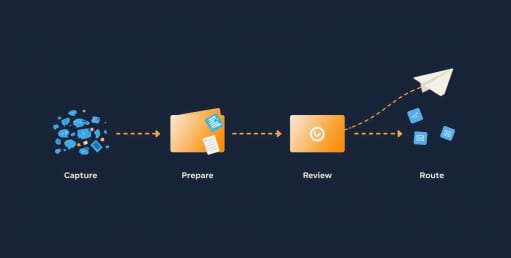
- 01
Request
Choose the employee request: vendor follow-up, status summary, intake triage, meeting handoff, or policy-aware draft.
- 02
Source
Name the planned source and data minimum: folder, export, excerpt, queue note, or manual upload.
- 03
Card
Write the identity, allowed tasks, stopped tasks, setup prompt, source boundary, owner, escalation path, and sample request.
- 04
Review
Name who approves source changes, outbound language, delivery choices, exceptions, and future scope.
- 05
Baseline
Capture private planning inputs such as request volume, time spent, rework pattern, and review burden without publishing ROI claims.
Example in plain English
Filled Business OS assistant card
A simple employee-facing card in the directory that shows the job, source, data limit, owner, allowed help, reviewed delivery surface, and stop points before anyone uses the assistant.
What Pulse helps with
Artifacts for review

Hub directory
Make assistants findable by employee request, source, owner, delivery surface, and stop condition.
View Hub directory
Source owner record
Record planned M365 folders, manual exports, redacted excerpts, and other confirmed sources as included or excluded from the card.
View Source owner record
Visible governance
Translate policy into guidance employees see before they ask the assistant.
View Visible governance
Reviewed output
Plan how the draft moves to email, Teams, Slack, portal, queue, or checklist only after owner review.
View Reviewed output
Change control
Track who can expand assistant scope, add sources, or change review rules.
View Change control
Baseline planning
Capture current volume, time spent, rework, and review burden as private planning inputs, not public ROI claims.
View Baseline planningExamples to review together
Confirmed examples only
Pulse Business AI shows screenshots, named sources, or customer references only when the supporting materials are cleared for public use.

Mock card
Vendor Queue Helper shows the card fields without implying a live customer deployment or connected tool.
Redacted request
Internal examples can remove names, customer details, and private source records while preserving the request shape.
Baseline notes
ROI planning stays private unless a customer approves exact public metrics and wording.

What stays reviewed
Supported language only
Pulse Business AI can describe M365 planning, source-boundary language, and internal request examples. New system names, customer references, proof labels, ROI metrics, and supporting details stay tied to confirmed evidence, source limits, and a named business reviewer.
Walkthroughs should show the workflow pattern and stay within the agreed source boundary.
M365 can be named as a planned source boundary; other systems stay out unless the use case and data limits are confirmed.
References, screenshots, and exact metrics appear only with customer-permitted backing.
Describe buyer intent, source boundaries, data minimization, review owner, delivery surface, and workflow shape.
Next steps
Choose the next useful action


Buyer clarity
Business OS buying questions answered in one place.
Use this section to confirm fit, expected deliverable, proof standard, existing-tool fit, and what remains human-owned.
Buying snapshot
Business OS: what a buyer should know before contacting Pulse.
A concise buying frame keeps the page tied to fit, artifact, scope, timeline, and accountable review before the next conversation.
Best forBuyer
Operations and business departments managing internal requests, owner updates, approvals, and recurring handoffs.
Start withFirst use case
One employee request that should become a visible assistant card with a source owner and stop points.
You receiveArtifact
Assistant card, source plan, allowed tasks, stopped tasks, reviewed output path, and baseline planning inputs.
What to sendInput
Repeated request pattern, source folder or export, desired output, delivery surface, reviewer, and sensitive details to exclude.
Human-ownedDecisions
Outbound messages, source expansion, policy exceptions, HR, legal, payroll, spend, contracts, and customer-sensitive decisions.
TimelineTypical first step
A first card can be planned from one redacted request; rollout timing depends on source approval and department review.
Pricing scopeDrivers
Request count, source access, departments involved, delivery surfaces, governance depth, and rollout support.
Proof-safe example
Inspect the artifact before trusting the claim.
Pulse proof should start with redacted or sample source material, a concrete artifact, and the human decision that remains outside automation.
InputSafe example
An employee asks for a vendor follow-up, status summary, intake triage, meeting handoff, or policy-aware draft.
ArtifactPrepared output
Assistant card with task fit, source boundary, data minimum, owner, review rule, and sample request.
ReviewWhat people decide
The department owner checks exceptions, outbound language, and future card expansion.
Existing-tool fit
Pulse works around the systems you already use.
The practical question is what stays in the current system, what Pulse drafts for owner review, and where automation must stop.
KeepExisting tools
Keep M365, Slack, Teams, Notion, ticket queues, HR, finance, legal, CRM, and systems of record in their current roles.
Use Pulse forReviewed handoffs
Use Business OS to prepare summaries, drafts, routes, and reviewed internal handoffs from approved sources.
Do not use Pulse forBoundary
Do not let an assistant make policy, people, financial, legal, or customer-impacting decisions.
Sample briefPulse Business OS
Get a sample Business OS operating brief in your inbox.
One readable summary of open approvals, vendor coordination, and decision items, sourced and routed to a named review owner. We will send the Business OS variant.
Check your inbox — your sample operating brief is on the way.
We couldn’t capture that. Email hello@pulsebusiness.ai instead.
One brief, no spam.
Next step
Create the first card employees can trust.
You now know the Business OS starting point: one employee request, one assistant card, one source owner, stopped tasks, a reviewed delivery surface, and an owner review rule.